Your Scheduler Can Finally See Your GPUs: Kubernetes DRA
Contents
Note: A big shout-out to the Kubernetes upstream community, especially WG Device Management, SIG Node and SIG Scheduling, who spent years taking DRA from an idea to a GA feature. Everything in this post is built on their work. Thank you!
Your node has 8 GPUs. A pod asks for nvidia.com/gpu: 1. Which GPU does it get? How much memory does that GPU have? Can another pod share it? With device plugins, Kubernetes can’t answer any of these: the scheduler only sees a number, 8, and the kubelet picks a card at the last moment. Dynamic Resource Allocation (DRA) fixes that. The scheduler sees every device with its model and memory, and a pod says exactly what it needs. DRA has been GA since Kubernetes v1.34, so it’s already switched on in your cluster.
In this post we’ll take baby steps: install a fake GPU driver on a kind cluster, then run three small demos.
- One GPU per pod
- One GPU shared by two pods
- Picking a GPU by its memory
You don’t need a real GPU.
DRA in one picture#
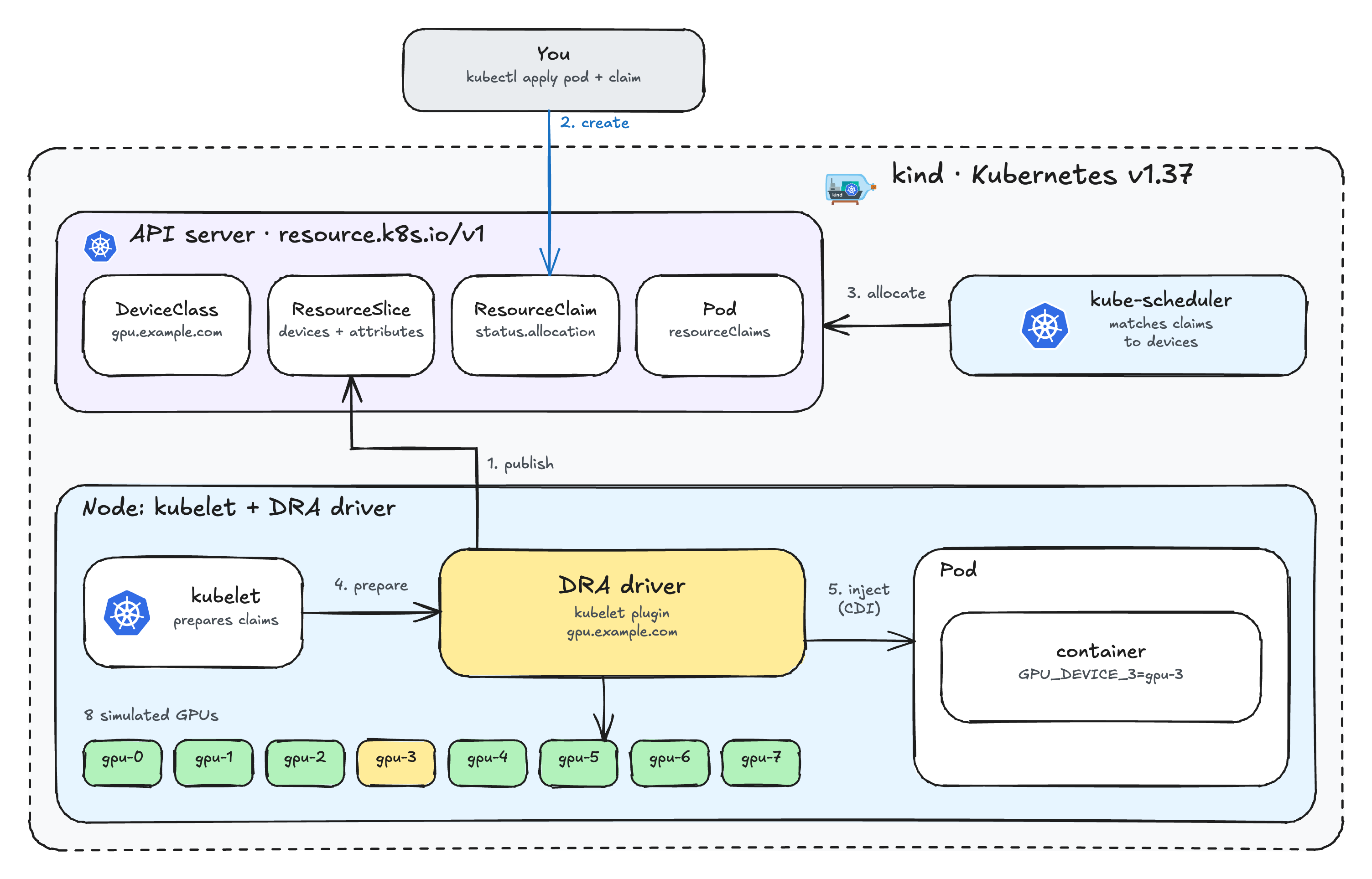
DRA adds four objects, all in resource.k8s.io/v1:
- DeviceClass: a type of device, like a StorageClass for GPUs.
- ResourceSlice: the driver’s list of devices on a node.
- ResourceClaim: a request for a device. Pods that use the same claim share the device.
- ResourceClaimTemplate: creates a new claim for each pod.
The driver publishes the devices, the scheduler matches your claim to one of them, and the kubelet asks the driver to hand it to the container. That’s all the theory we need, so let’s build it.
Demo setup#
What I’m using:
| Tool | Version |
|---|---|
| kind | v0.33.0 or newer |
| kubectl | v1.37 |
| Helm | v3 |
| dra-example-driver | v0.5.0 |
If you don’t have a cluster yet:
kind create cluster --name dra-demo --image kindest/node:v1.37.0
First, check that the DRA API is served. You should see deviceclasses, resourceclaims, resourceclaimtemplates and resourceslices (plus devicetaintrules on v1.37):

Install the example driver#
The driver’s Helm chart lives in the repository, and the image is published on registry.k8s.io, so there is nothing to build:
git clone --depth 1 -b v0.5.0 https://github.com/kubernetes-sigs/dra-example-driver.git
cd dra-example-driver

helm upgrade -i dra-example-driver deployments/helm/dra-example-driver \
  --namespace dra-example-driver --create-namespace

kubectl -n dra-example-driver rollout status ds/dra-example-driver-kubeletplugin
The driver created a DeviceClass:

And published a ResourceSlice for the node, listing each device with its model and memory:
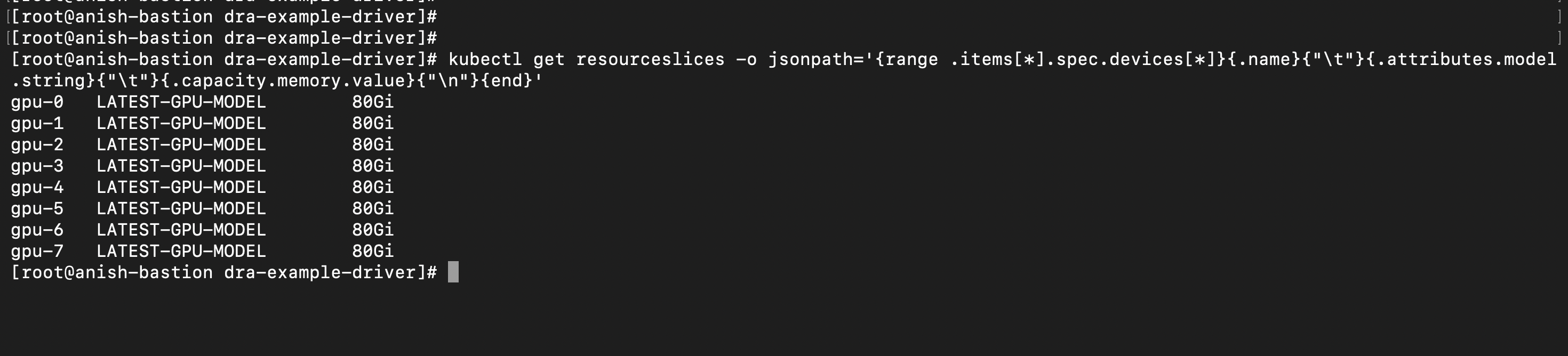
Eight simulated 80 GiB GPUs, all visible to the scheduler before any pod asks for them. With a device plugin, all you’d see is gpu: 8 in the node’s capacity.
The fake GPUs aren’t mounted into containers. Instead, the driver sets an environment variable like GPU_DEVICE_3=gpu-3 in each container, so we can see which device a pod got.
kubectl create namespace dra-demo
Demo 1: One GPU per pod#
A ResourceClaimTemplate gives every pod its own claim, and so its own GPU:
cat <<EOF | kubectl apply -f -
apiVersion: resource.k8s.io/v1
kind: ResourceClaimTemplate
metadata:
  name: single-gpu
  namespace: dra-demo
spec:
  spec:
    devices:
      requests:
      - name: gpu
        exactly:
          deviceClassName: gpu.example.com
---
apiVersion: v1
kind: Pod
metadata:
  name: pod-a
  namespace: dra-demo
spec:
  containers:
  - name: ctr
    image: busybox:1.37
    command: ["sh", "-c", "env | grep GPU_DEVICE; trap 'exit 0' TERM; sleep 3600 & wait"]
    resources:
      claims:
      - name: gpu
  resourceClaims:
  - name: gpu
    resourceClaimTemplateName: single-gpu
---
apiVersion: v1
kind: Pod
metadata:
  name: pod-b
  namespace: dra-demo
spec:
  containers:
  - name: ctr
    image: busybox:1.37
    command: ["sh", "-c", "env | grep GPU_DEVICE; trap 'exit 0' TERM; sleep 3600 & wait"]
    resources:
      claims:
      - name: gpu
  resourceClaims:
  - name: gpu
    resourceClaimTemplateName: single-gpu
EOF
Two places in the pod spec matter: spec.resourceClaims says where the claim comes from, and containers[].resources.claims says which container gets it.
Each pod gets a different GPU. In my run, pod-a got gpu-1 and pod-b got gpu-0 (your indexes may differ):
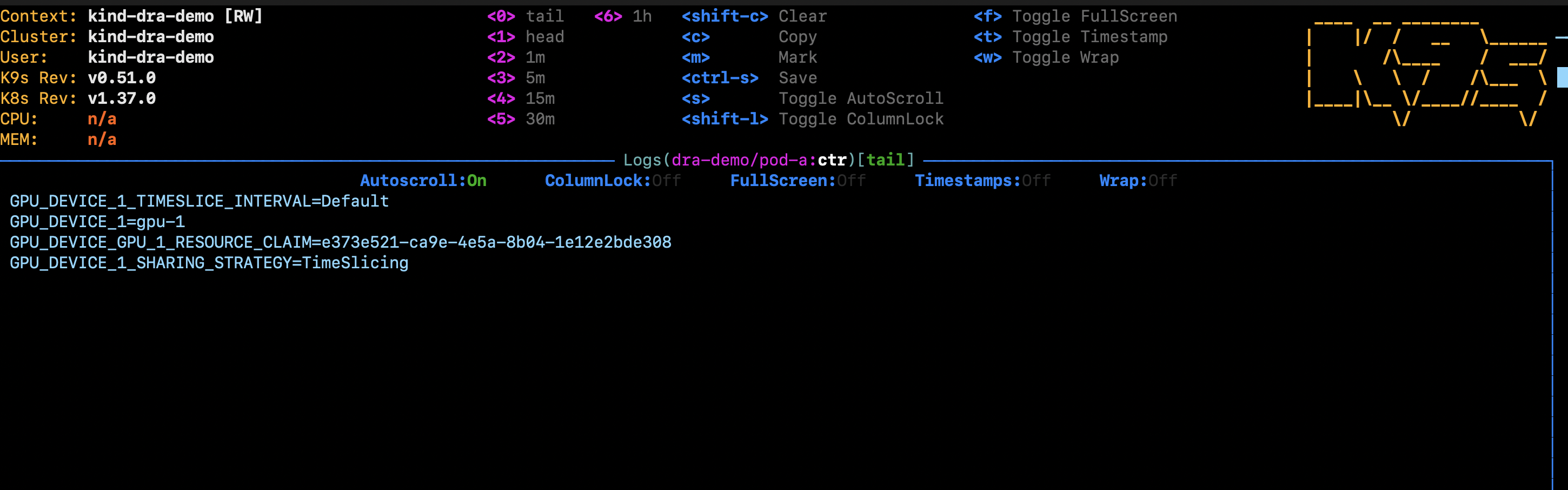
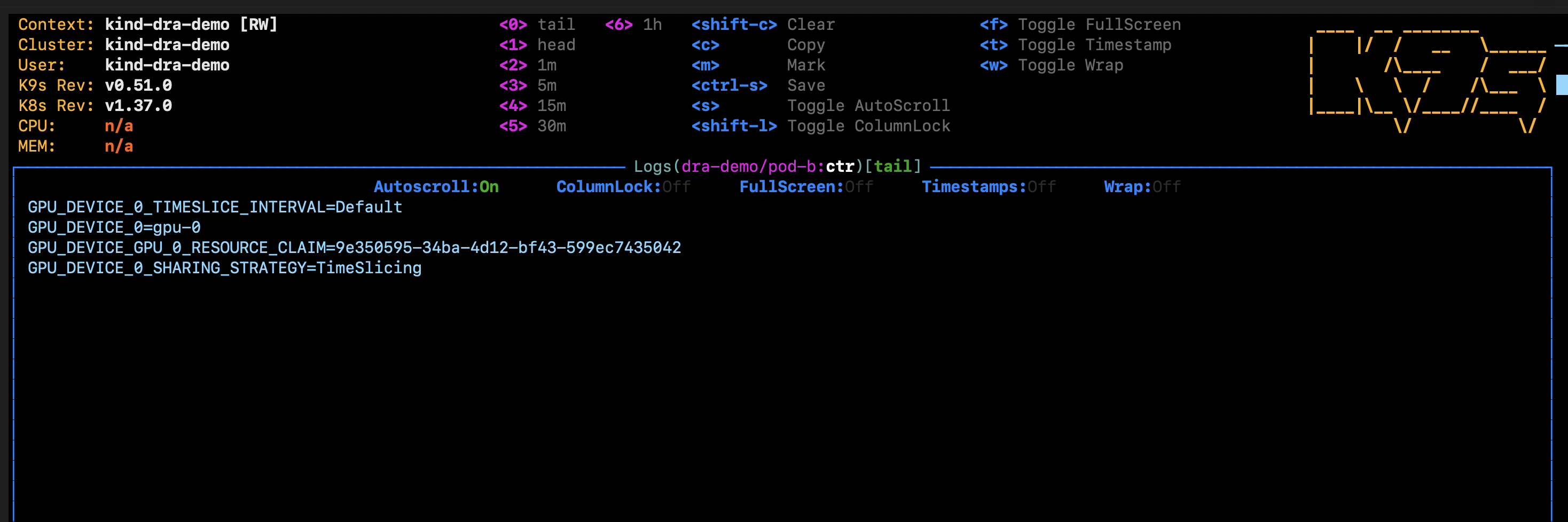
The screenshots show the full env output from the pod. Besides GPU_DEVICE_N, the example driver sets the claim’s UID (..._RESOURCE_CLAIM) and its default sharing settings (TimeSlicing, Default interval). A real driver would use these to configure the card. Notice that the two pods have different claim UIDs.
Kubernetes created one claim per pod from the template:
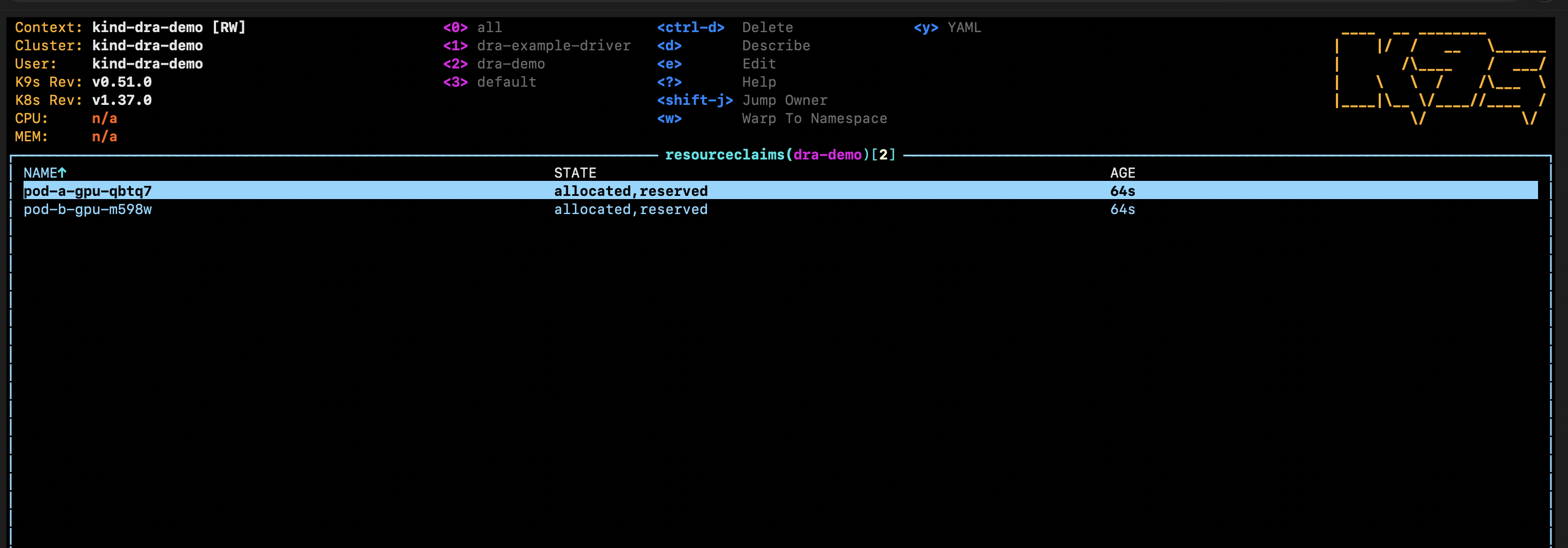
allocated means the scheduler picked a device. reserved means a pod is using it. To see exactly which device was picked:
kubectl -n dra-demo get resourceclaims -o jsonpath='{range .items[*]}{.metadata.name}{" -> "}{.status.allocation.devices.results[0].device}{"\n"}{end}'
When a pod is deleted, its generated claim is deleted with it and the GPU goes back to the pool.
Demo 2: Two pods share one GPU#
To share a device, create a ResourceClaim directly and point both pods at it by name:
cat <<EOF | kubectl apply -f -
apiVersion: resource.k8s.io/v1
kind: ResourceClaim
metadata:
  name: shared-gpu
  namespace: dra-demo
spec:
  devices:
    requests:
    - name: gpu
      exactly:
        deviceClassName: gpu.example.com
---
apiVersion: v1
kind: Pod
metadata:
  name: shared-1
  namespace: dra-demo
spec:
  containers:
  - name: ctr
    image: busybox:1.37
    command: ["sh", "-c", "env | grep GPU_DEVICE; trap 'exit 0' TERM; sleep 3600 & wait"]
    resources:
      claims:
      - name: gpu
  resourceClaims:
  - name: gpu
    resourceClaimName: shared-gpu
---
apiVersion: v1
kind: Pod
metadata:
  name: shared-2
  namespace: dra-demo
spec:
  containers:
  - name: ctr
    image: busybox:1.37
    command: ["sh", "-c", "env | grep GPU_DEVICE; trap 'exit 0' TERM; sleep 3600 & wait"]
    resources:
      claims:
      - name: gpu
  resourceClaims:
  - name: gpu
    resourceClaimName: shared-gpu
EOF
The only difference from demo 1 is resourceClaimName instead of resourceClaimTemplateName.
Both pods print the same device, gpu-2, and the same claim UID. That’s the difference from demo 1: one claim, one GPU, two consumers. With a real driver, the TimeSlicing setting is what lets both pods use the card at once.
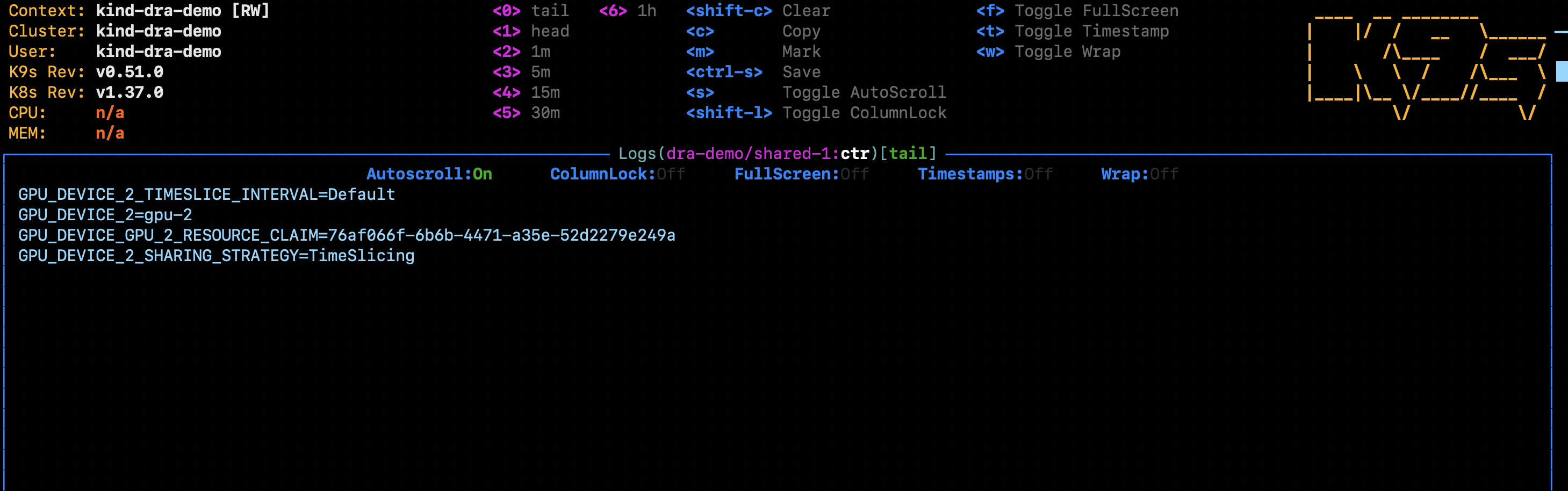
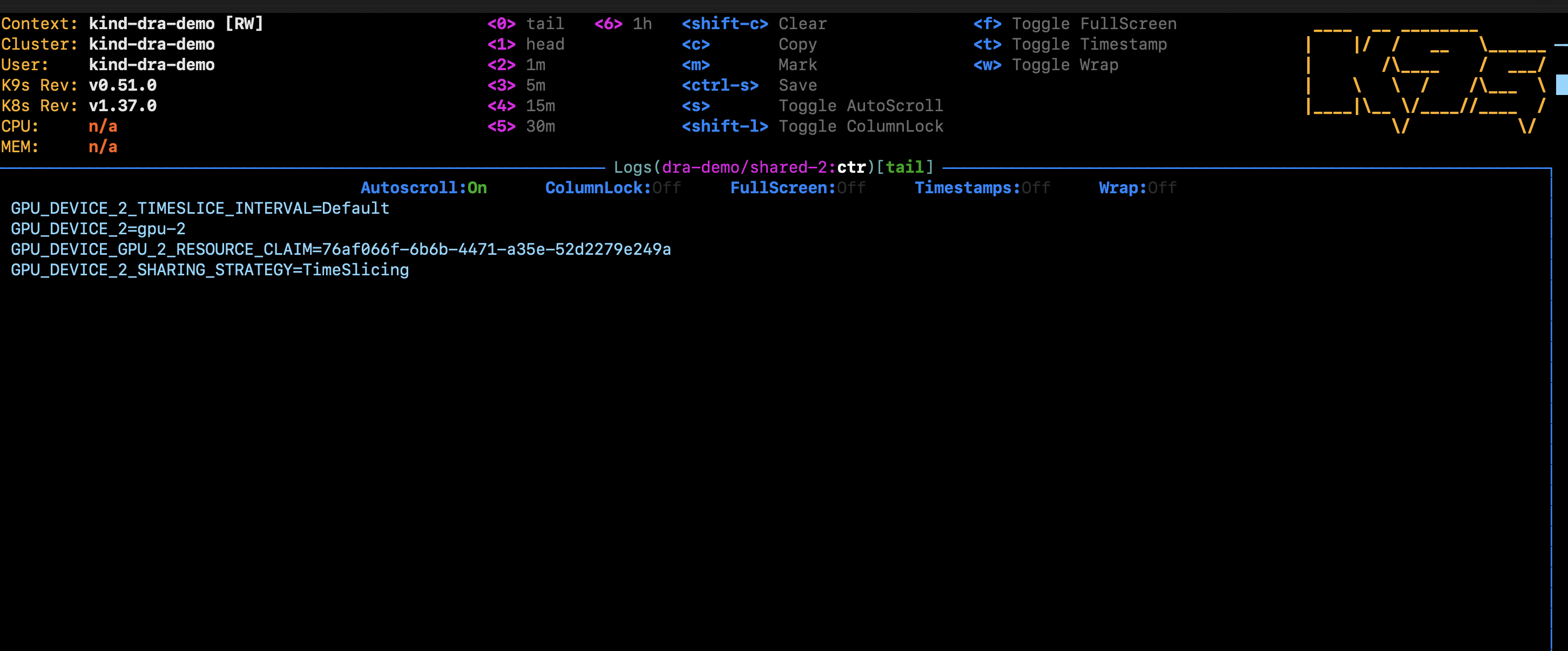
The claim’s status shows the one allocated device and both pods as consumers:
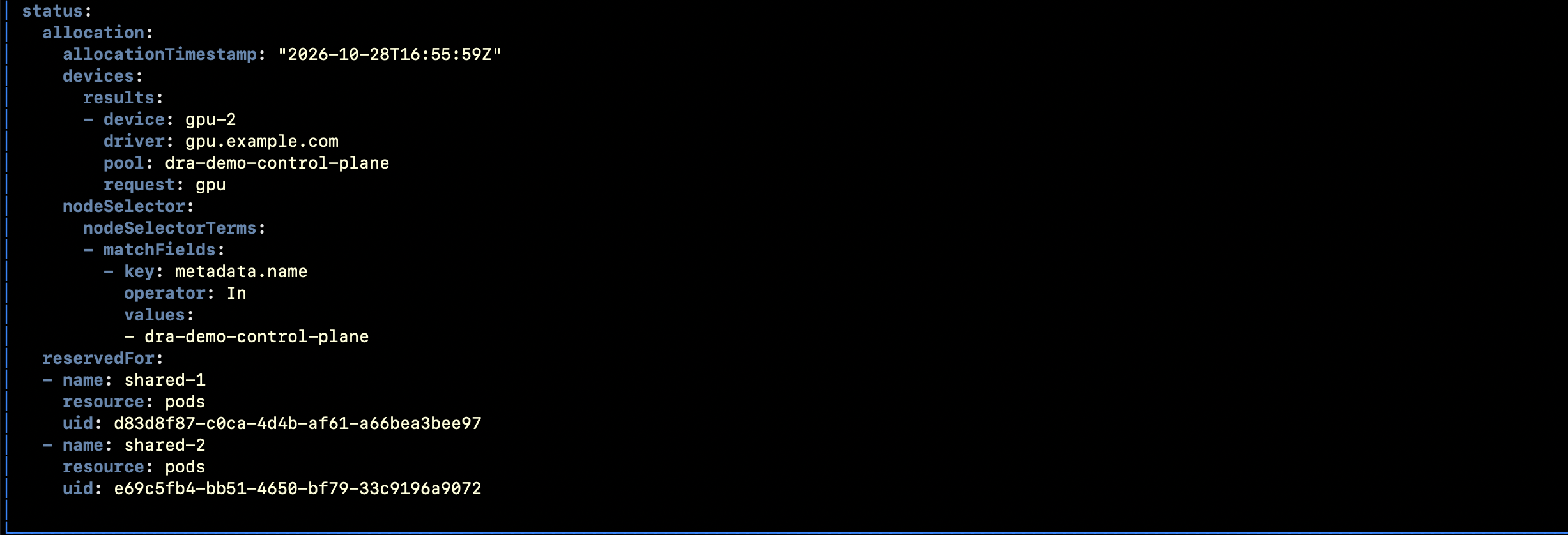
Notice what the scheduler does not know: how much of gpu-2 each pod will use. It handed the whole card to one claim, and both pods get all of it. How they share it (time-slicing, MPS, …) is the driver’s job, and nothing stops one pod from taking all the memory. If you want each pod to get a fixed amount, you need consumable capacity, which comes next.
Sharing a GPU by amount: consumable capacity#
Since v1.36, a driver can let several claims share one device, and each claim asks for an amount:
capacity:
  requests:
    memory: 16Gi
    compute: "20"
The scheduler adds up the slices and stops when the GPU is full. It only does the accounting, though: keeping a pod inside its 16 GiB is still the driver’s job. Try it with the example driver’s gpu-allow-multiple-allocations example.
Demo 3: Pick a GPU by its attributes#
Device plugins can’t filter by device properties. DRA lets you write CEL expressions against the attributes and capacity in the ResourceSlice. Let’s ask for a GPU with at least 40 GiB of memory, and then one with at least 100 GiB, which doesn’t exist:
cat <<EOF | kubectl apply -f -
apiVersion: resource.k8s.io/v1
kind: ResourceClaimTemplate
metadata:
  name: gpu-40gi
  namespace: dra-demo
spec:
  spec:
    devices:
      requests:
      - name: gpu
        exactly:
          deviceClassName: gpu.example.com
          selectors:
          - cel:
              expression: "device.attributes['gpu.example.com'].model == 'LATEST-GPU-MODEL'"
          - cel:
              expression: "device.capacity['gpu.example.com'].memory.compareTo(quantity('40Gi')) >= 0"
---
apiVersion: resource.k8s.io/v1
kind: ResourceClaimTemplate
metadata:
  name: gpu-100gi
  namespace: dra-demo
spec:
  spec:
    devices:
      requests:
      - name: gpu
        exactly:
          deviceClassName: gpu.example.com
          selectors:
          - cel:
              expression: "device.capacity['gpu.example.com'].memory.compareTo(quantity('100Gi')) >= 0"
---
apiVersion: v1
kind: Pod
metadata:
  name: big-gpu
  namespace: dra-demo
spec:
  containers:
  - name: ctr
    image: busybox:1.37
    command: ["sh", "-c", "env | grep GPU_DEVICE; trap 'exit 0' TERM; sleep 3600 & wait"]
    resources:
      claims:
      - name: gpu
  resourceClaims:
  - name: gpu
    resourceClaimTemplateName: gpu-40gi
---
apiVersion: v1
kind: Pod
metadata:
  name: huge-gpu
  namespace: dra-demo
spec:
  containers:
  - name: ctr
    image: busybox:1.37
    command: ["sh", "-c", "env | grep GPU_DEVICE; trap 'exit 0' TERM; sleep 3600 & wait"]
    resources:
      claims:
      - name: gpu
  resourceClaims:
  - name: gpu
    resourceClaimTemplateName: gpu-100gi
EOF
Both templates are created next to single-gpu from demo 1:
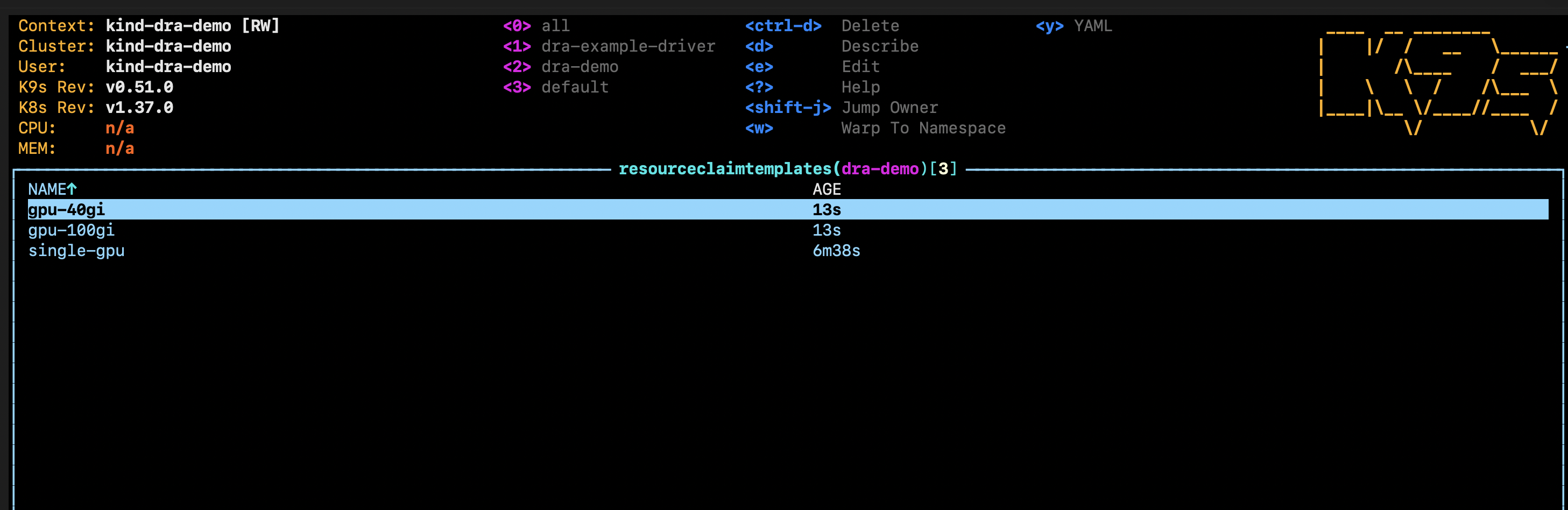
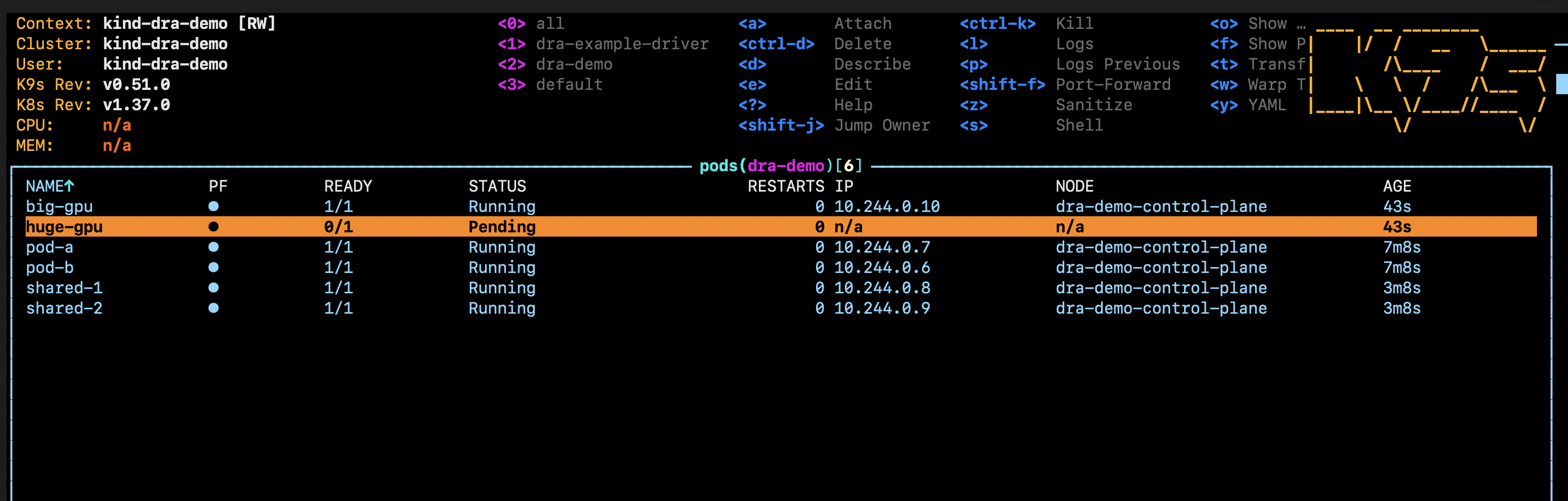
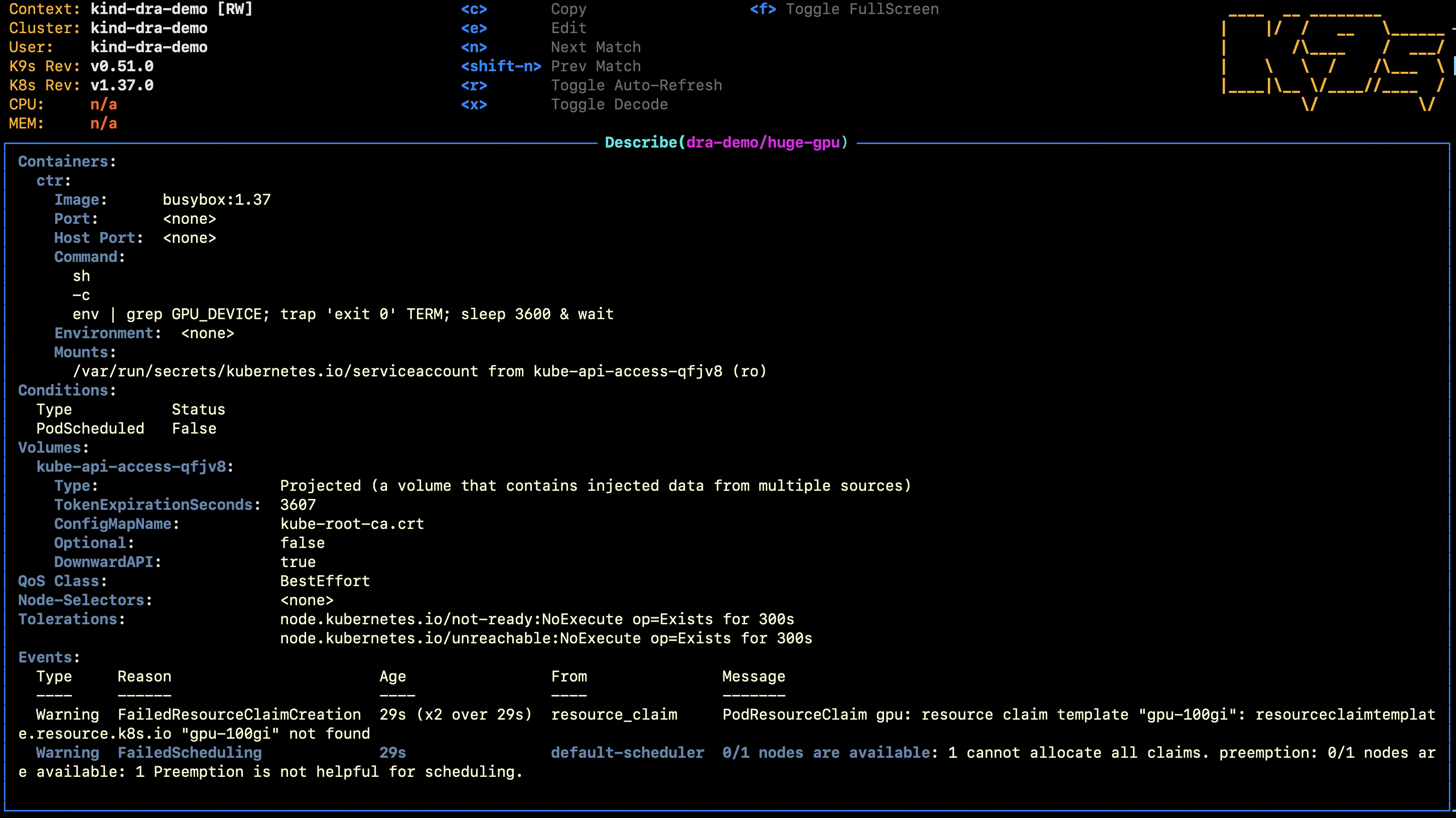
big-gpu runs because every simulated GPU has 80 GiB. huge-gpu stays Pending, and the scheduler tells you why:
Cleanup#
kubectl delete namespace dra-demo
helm -n dra-example-driver uninstall dra-example-driver
kind delete cluster --name dra-demo
DRA vs HAMi#
If you read my Kamaji + HAMi post, you might ask: does DRA replace HAMi? Not really.
| DRA | HAMi | |
|---|---|---|
| What it is | Built-in Kubernetes API | CNCF project for GPU sharing |
| GPU slices | Scheduler tracks them (consumable capacity) | Memory in MiB, compute in % |
| Limits inside the container | None, up to the driver | Enforced by HAMi-core |
They now work together: HAMi-DRA uses DRA for scheduling and HAMi-core for limits.
- Use DRA for whole GPUs, picking GPUs by attributes, or MIG.
- Use HAMi (on DRA) when you need GPU slices with enforced limits.
- Use classic HAMi on clusters older than v1.34 or for accelerators without a DRA driver.
What I didn’t cover#
DRA keeps growing: prioritized alternatives, device taints, partitionable devices and more. See the Kubernetes v1.37 release for where each one stands.
Conclusion#
DRA turns devices into first-class, describable objects in the Kubernetes API. The driver publishes what it has, the pod says what it needs, and the scheduler matches the two before anything runs. For real hardware, the NVIDIA DRA driver for GPUs follows the same model, so the YAML you wrote here carries over almost as-is.