NVIDIA Just Open-Sourced Run:ai. Let's Try It With 32 Fake GPUs
Contents
NVIDIA bought Run:ai in 2024. On October 13, 2026, it open-sourced the whole Run:ai platform under Apache 2.0. Until then, the full platform needed a paid license. In this post I explain what Run:ai is and then run the whole thing, UI included, on one VM with no GPU.
What is Run:ai?#
Run:ai is a GPU platform for AI teams that share one pool of GPUs, built on top of Kubernetes:
- Admins create projects (teams) and give each a guaranteed GPU quota. Idle quota is lent to other teams and taken back when its owner needs it.
- Users submit trainings, notebooks and inference through a web UI, CLI or API, and can ask for whole GPUs or fractions like 0.5.
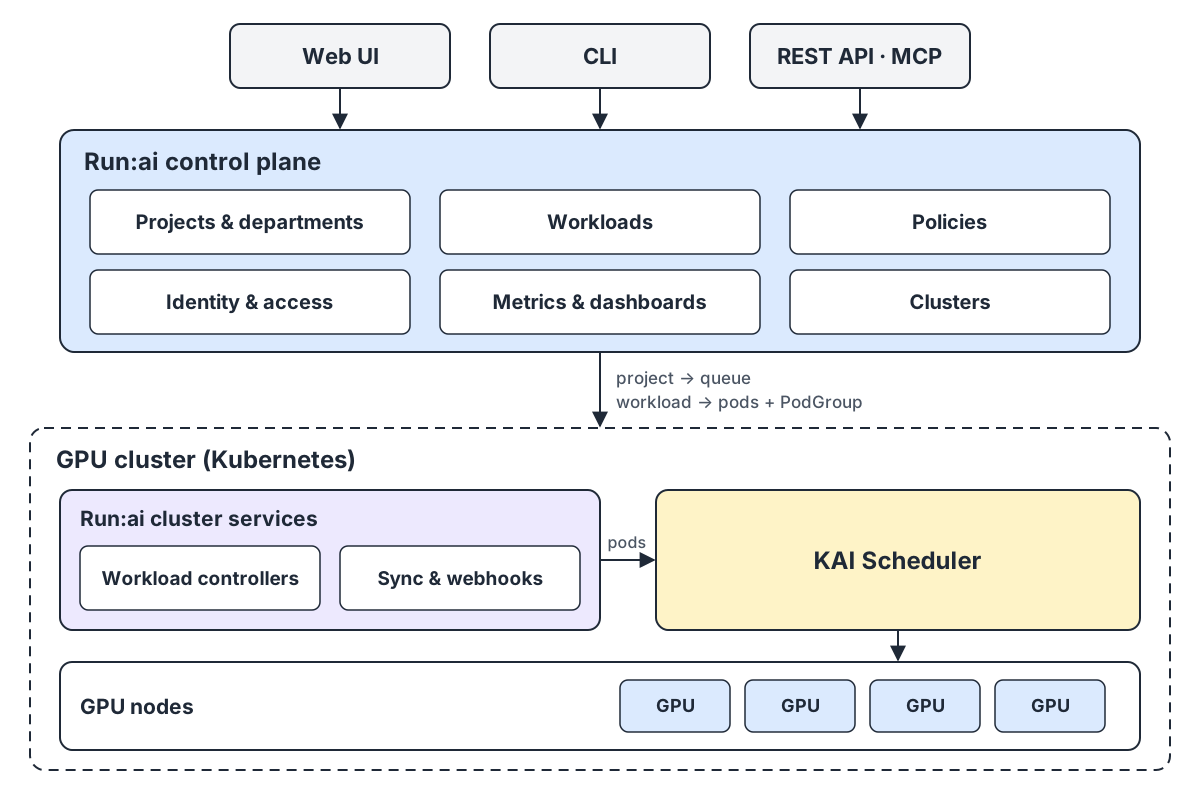
It has two layers. The control plane (UI, API, projects, users, dashboards) is the front end. The cluster services in each GPU cluster turn workloads into pods, and the KAI Scheduler inside them decides which pod runs, when, and on which GPU. KAI has been open source since 2025. Now the rest of the platform is open too.
| You do this in Run:ai | KAI sees this in the cluster |
|---|---|
| Create a project with a GPU quota | A Queue with that gpu.quota |
| Submit a training or notebook | Pods with schedulerName: kai-scheduler and a PodGroup |
| Ask for half a GPU | The gpu-fraction: "0.5" annotation |
In the demo you’ll use the Run:ai CLI and UI, then look underneath with kubectl to see what KAI did. Everything is in dsx-ai-factory/run-ai. KAI and a few other parts can also be used on their own.
Lab setup#
The repo’s local-dev.sh script builds all of Run:ai from source and runs it on kind. Its guide asks for at least 4 CPUs, 16 GB of RAM and 100 GB of disk on Linux, so I used a VM:
| Item | Value |
|---|---|
| Host | 1 RHEL VM: 16 vCPU, 32 GB RAM, 200 GB disk, no GPU |
| Kubernetes | kind, 1 control plane + 4 workers (created by the script) |
| GPUs | fake-gpu-operator, 8 simulated GPUs per worker (installed by the script) |
| Run:ai | Built from source: about 50 Go services, plus the UI |
| Access | Run:ai CLI on the VM, browser on my laptop (runai.local in /etc/hosts) |
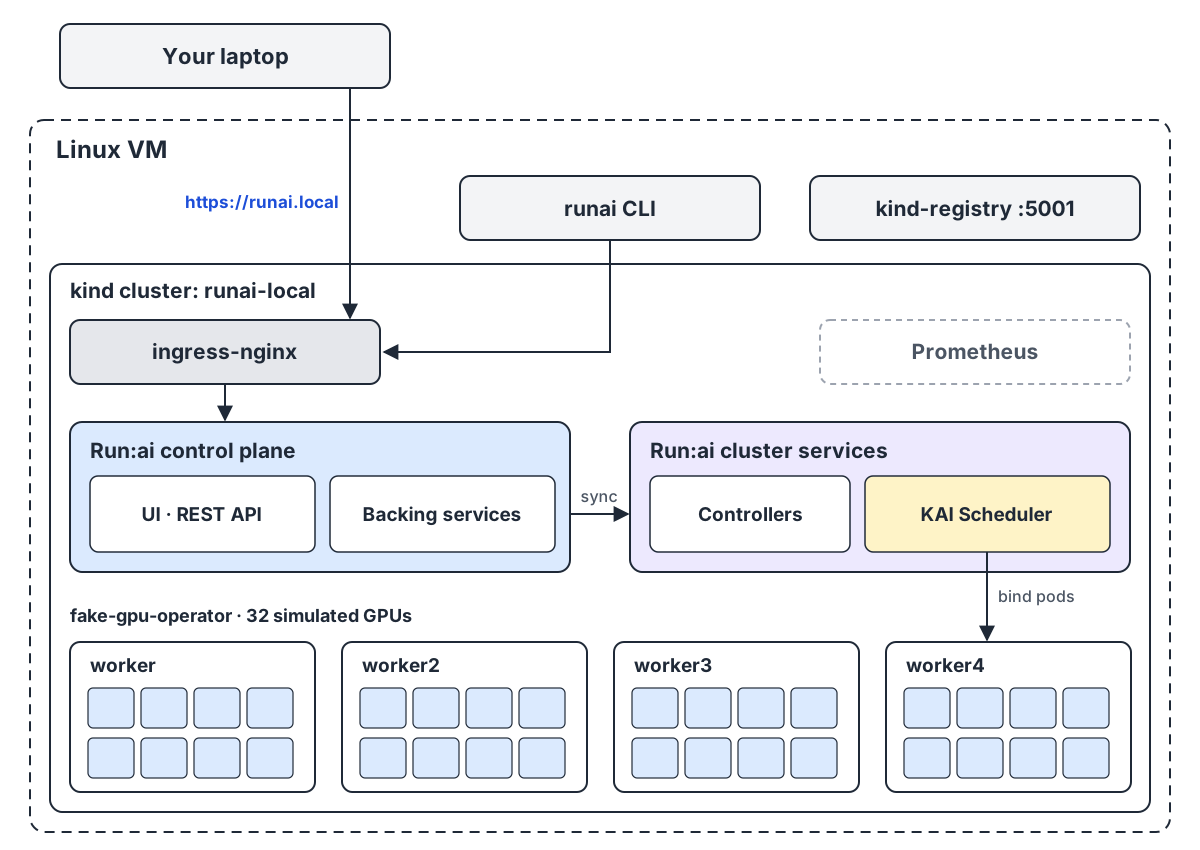
No GPU? The fake-gpu-operator, from the Run:ai team, makes CPU-only nodes advertise nvidia.com/gpu. Nothing runs on a real GPU, but every scheduling decision is real.
Step 1: Install Docker and a few tools#
Install Docker by following the official guide for your OS (I used RHEL). The script checks for a few basic tools and stops if one is missing. On my RHEL VM, python3 wasn’t installed:
sudo dnf install -y make git curl python3 openssl
The script installs kind, kubectl and helm itself, and raises the kernel limits kind needs.
Step 2: Build and deploy Run:ai#
git clone https://github.com/dsx-ai-factory/run-ai.git
cd run-ai
./local-dev.sh --parallel 8
You’ll see a warning that GITHUB_TOKEN is not set. You can ignore it. It was needed while the repo was private, and the modules the build pulls are now public.
--parallel sets how many services build at once. The default is 4. Each build uses CPU and RAM, so 8 is a good fit for 16 cores and 32 GB.
The first run takes a while. It:
- creates a local CA (“RunAI Local CA”), uses it to sign a certificate for
runai.local, and addsrunai.localto/etc/hosts - creates the kind cluster
runai-localand a local image registry - installs ingress-nginx, a small Prometheus and the fake-gpu-operator
- builds about 50 Go services and the UI inside containers (no Go or Node needed on the host, though the CLI in Step 4 does need Go)
- deploys the control plane (namespace
runai-backend), registers the cluster with it, and deploys the cluster services (namespacerunai), which include KAI
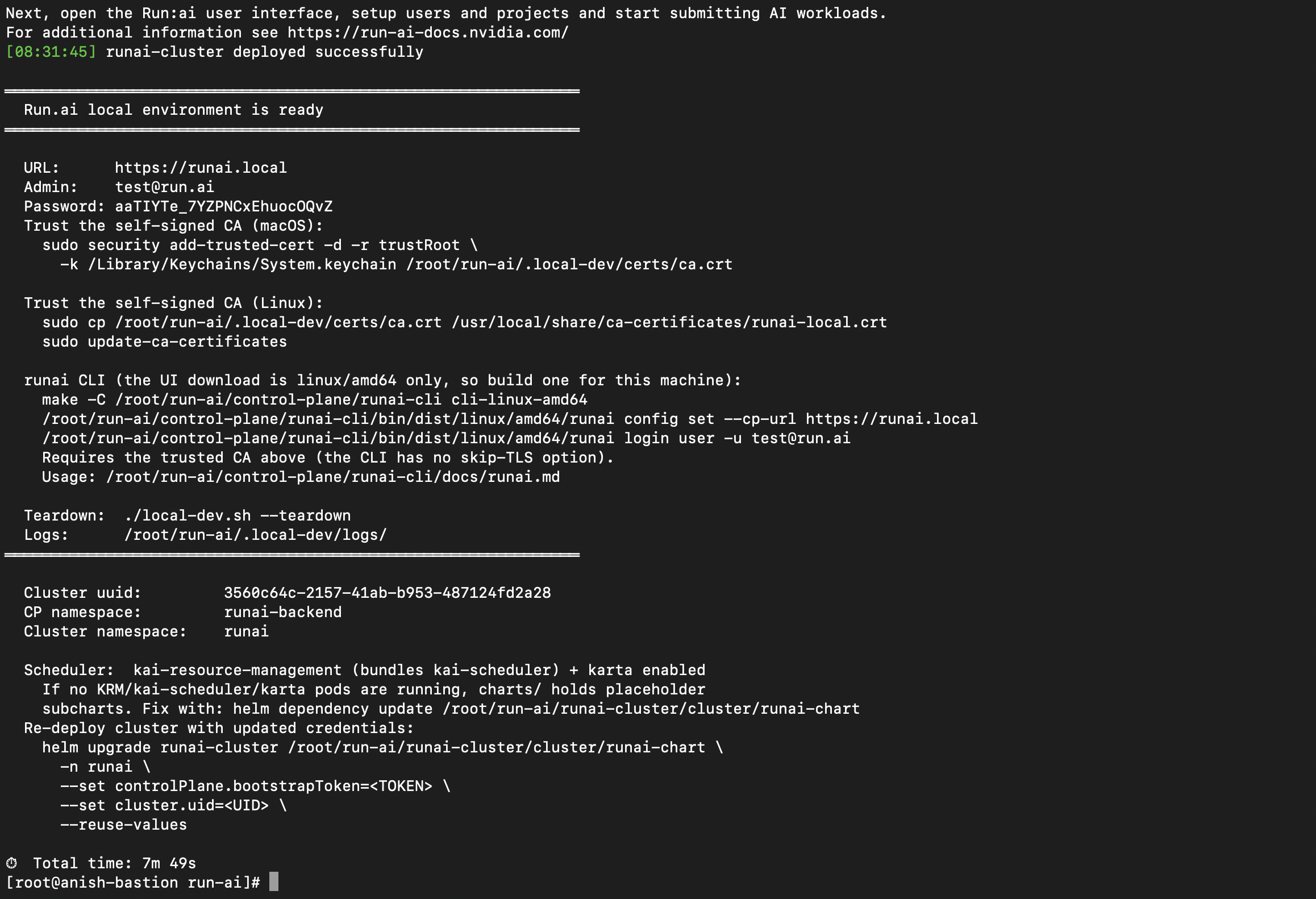
At the end it prints a summary with the URL, admin email and password, plus the commands to set up the CLI. Save it.
If the script exits silently after Could not fetch kai-resource-management@"~0.18.0" — installing an EMPTY placeholder: that’s a bug in the script’s handling of the chart’s version range (#2716). The cluster services never install, so the runai namespace stays empty. Pin the version and rerun:
sed -i 's/version: "~0.18.0"/version: 0.18.5/' runai-cluster/cluster/runai-chart/Chart.yaml
./local-dev.sh --skip-build
Check that everything is up:
kubectl get nodes
kubectl -n runai-backend get pods
kubectl -n runai get pods
kubectl get nodes -o 'custom-columns=NAME:.metadata.name,GPUS:.status.allocatable.nvidia\.com/gpu'
The four workers should each show 8 GPUs, 32 in total. The demos below assume 32. If you see a different number, scale the GPU counts in the commands to match.
Step 3: Open the UI from your laptop#
Add the VM to your laptop’s /etc/hosts:
<vm-ip> runai.local
Open https://runai.local and log in with the admin credentials from the summary.
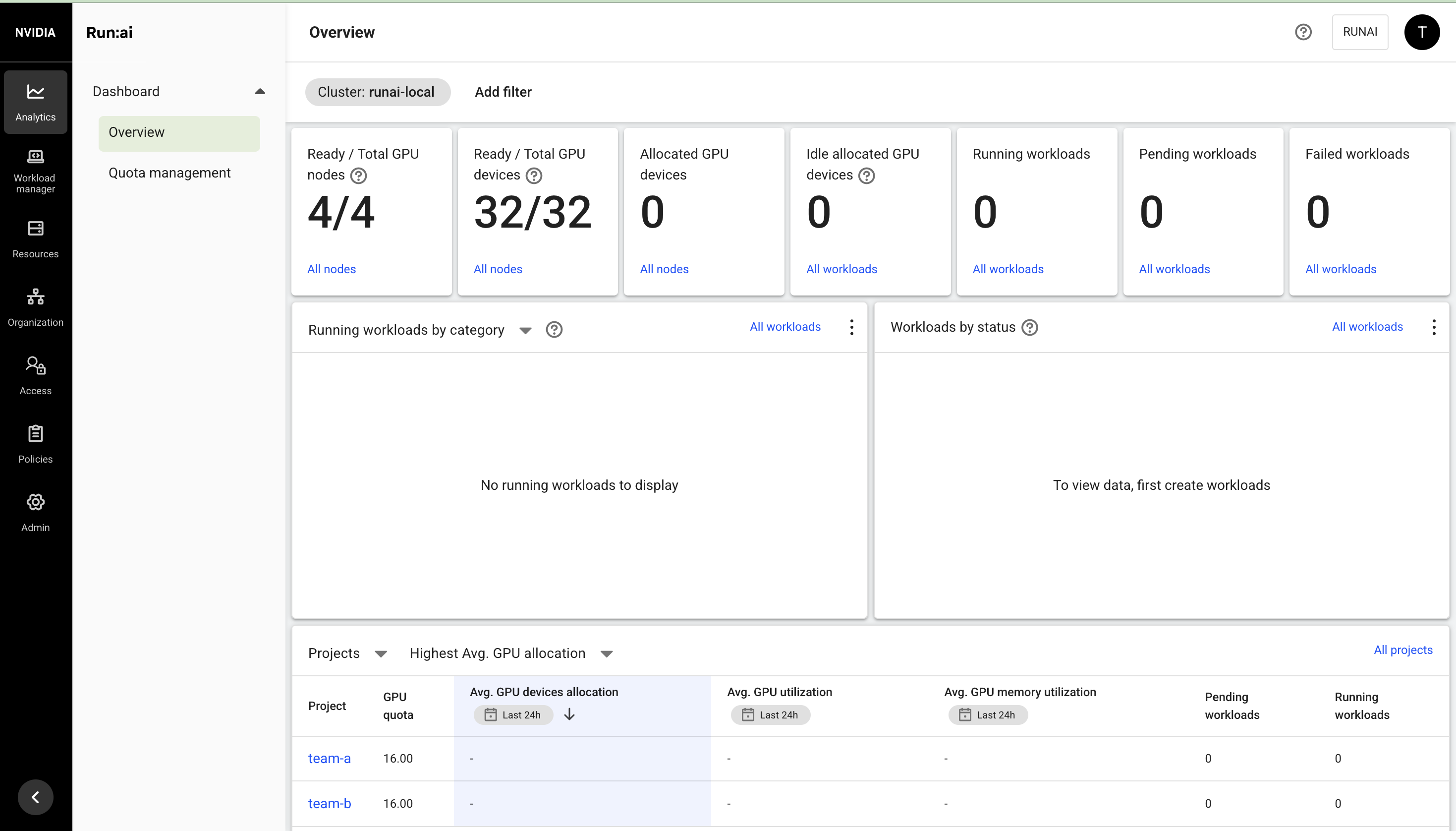
After login, the Overview dashboard shows the cluster: 4/4 GPU nodes and 32/32 GPU devices, all simulated by the fake-gpu-operator.
Step 4: Set up the CLI (on the VM)#
The CLI has no skip-TLS option, so trust the local CA first, or runai login fails with x509: certificate signed by unknown authority. The summary’s Linux commands only work on Debian/Ubuntu. On RHEL, use:
sudo cp .local-dev/certs/ca.crt /etc/pki/ca-trust/source/anchors/runai-local.crt
sudo update-ca-trust extract
Then build the CLI, point it at the control plane and log in. The build runs on the host and needs the Go version from control-plane/runai-cli/go.mod (1.27.1 at the time of writing). Use cli-linux-arm64 and the matching path if your VM is ARM:
make -C control-plane/runai-cli cli-linux-amd64
export PATH="$PWD/control-plane/runai-cli/bin/dist/linux/amd64:$PATH"

runai config set --cp-url https://runai.local
runai login user -u test@run.ai   # paste the password from the summary
runai cluster list
runai cluster list should show runai-local as Connected.
Demo 1: Projects become queues#
In Run:ai: an admin creates projects and gives each a guaranteed GPU quota (Run:ai calls it deserved). Create two teams that share the 32 GPUs equally, with no upper limit when GPUs are idle:
runai project create team-a --resources gpu-deserved=16,gpu-limit=-1
runai project create team-b --resources gpu-deserved=16,gpu-limit=-1
runai project list
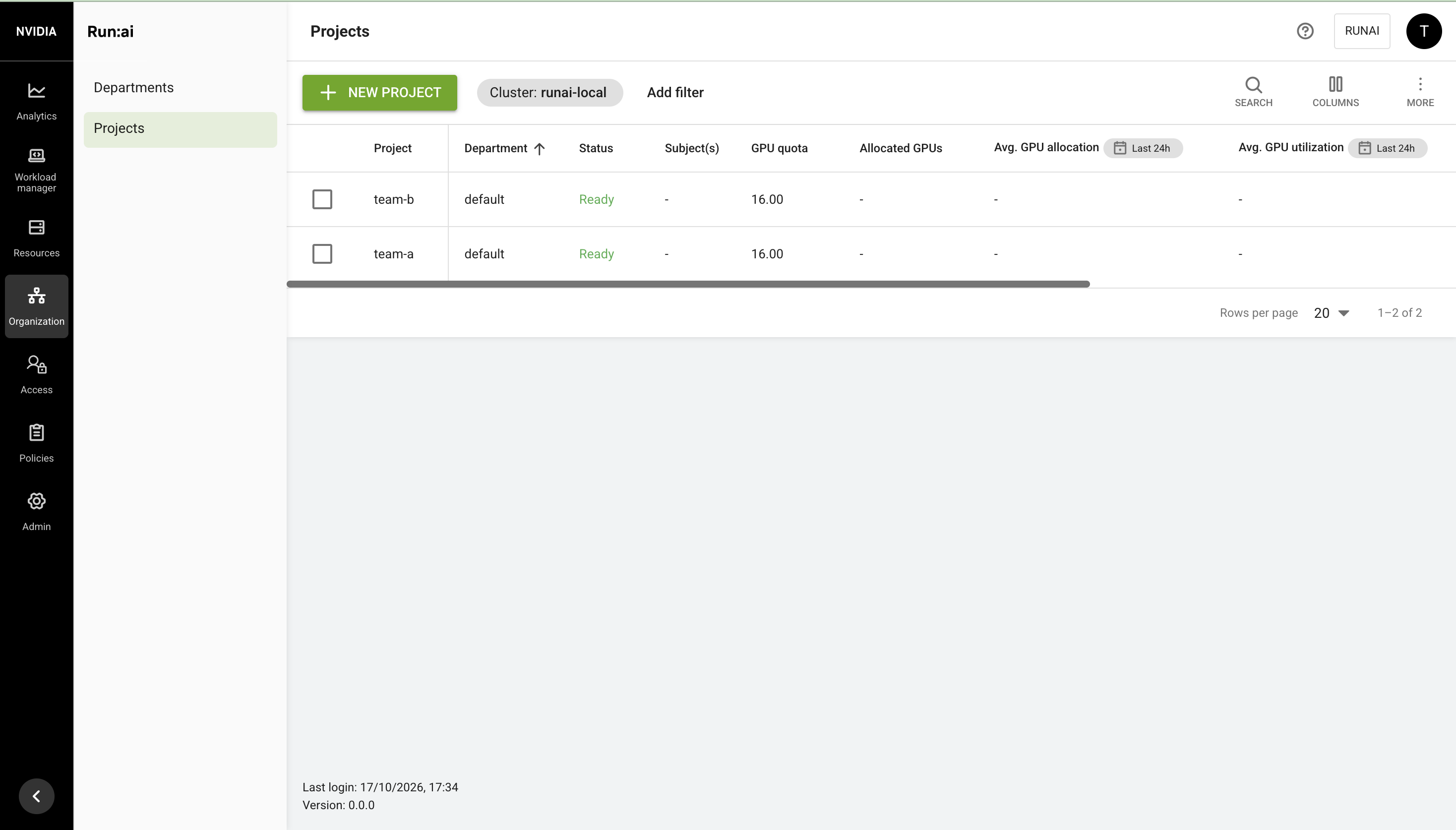
Both projects land in the default department. You can do the same thing in the UI’s Projects page, and the new projects show up there either way.
Underneath: look at what Run:ai created in the cluster:
kubectl get queues
kubectl get namespaces | grep team
You should see a KAI queue for each project, plus one for the department above them (q-4500000 in my run, with team-a and team-b as its children), and a namespace for each project (runai-team-a and runai-team-b):
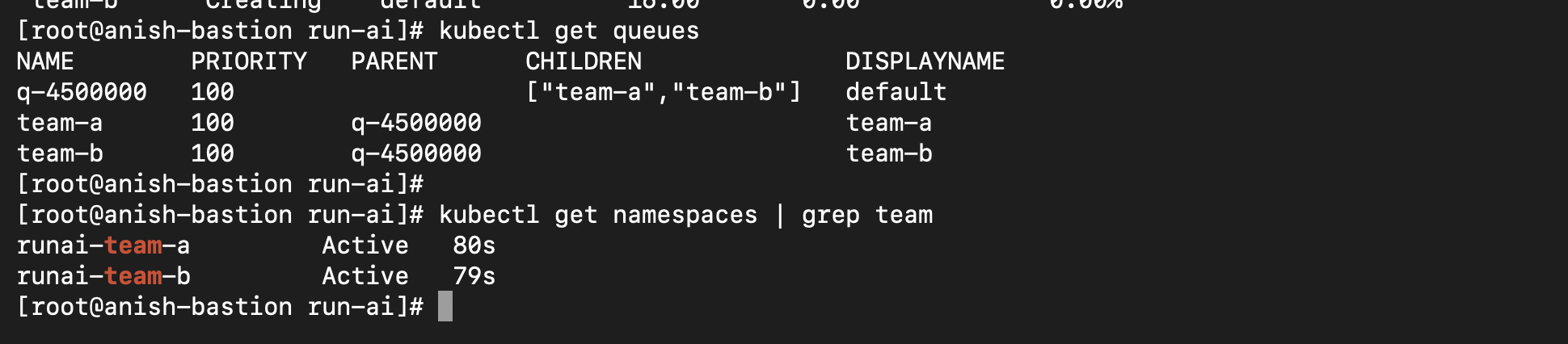
Run kubectl get queue <name> -o yaml on a project’s queue and you’ll find gpu.quota: 16. That’s the number you typed into the CLI, now in a form KAI can enforce.
Demo 2: Two notebooks on one GPU#
In Run:ai: a user starts two notebooks (Run:ai calls them workspaces), each asking for half a GPU:
runai workspace submit nb1 -p team-a -i ubuntu --gpu-portion-request 0.5 --command -- sleep infinity
runai workspace submit nb2 -p team-a -i ubuntu --gpu-portion-request 0.5 --command -- sleep infinity
runai workspace list -p team-a
Underneath:
kubectl get pods -A -o wide | grep -E 'nb1|nb2'
kubectl -n runai-reservation get pods -o wide
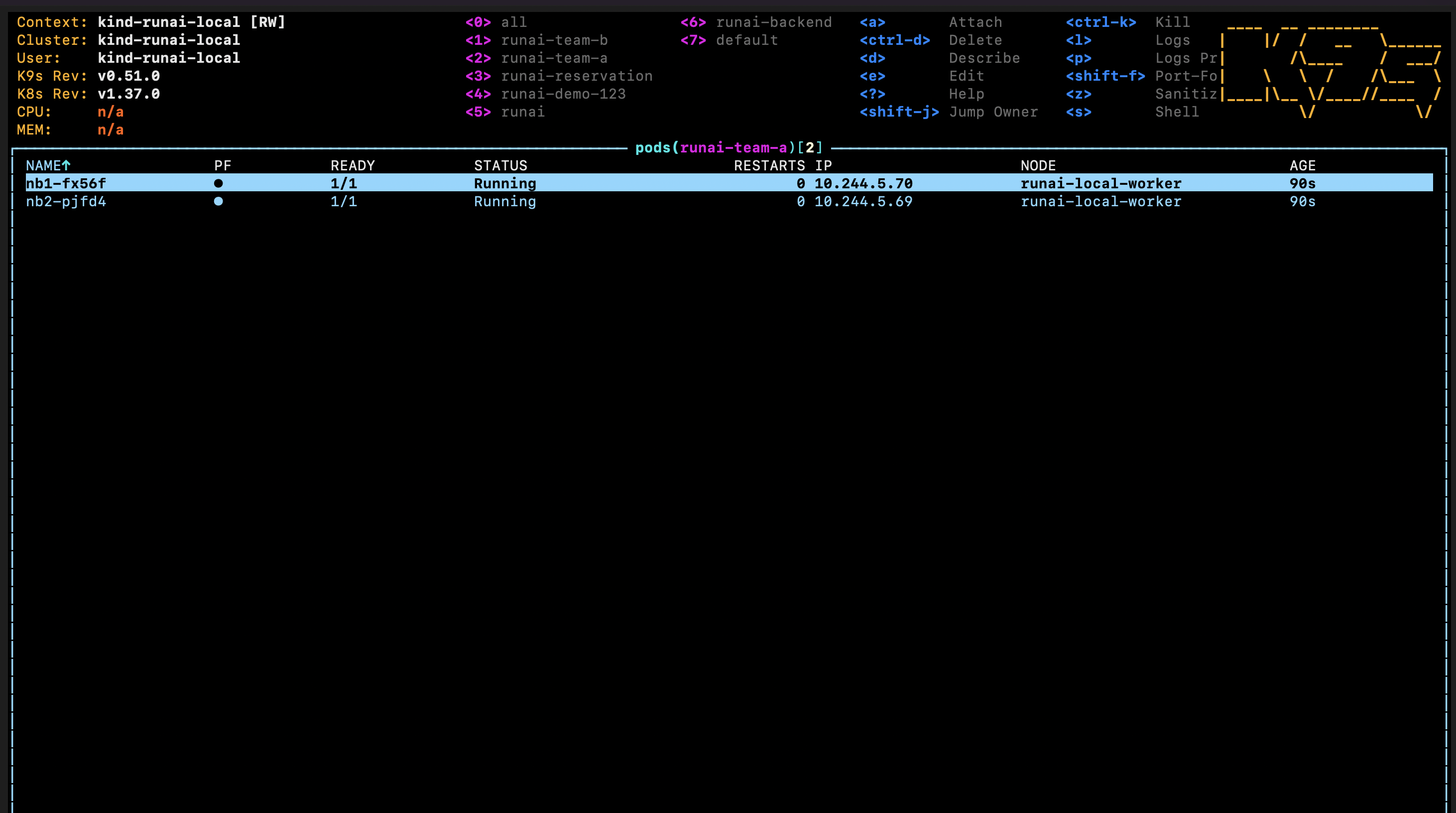
Expected: both workspaces are Running on the same node, and runai-reservation has one reservation pod on that node. KAI holds one physical GPU with the reservation pod and puts both halves on it. To see the request Run:ai translated for KAI, check a workspace pod’s annotations for gpu-fraction: "0.5" and its schedulerName.
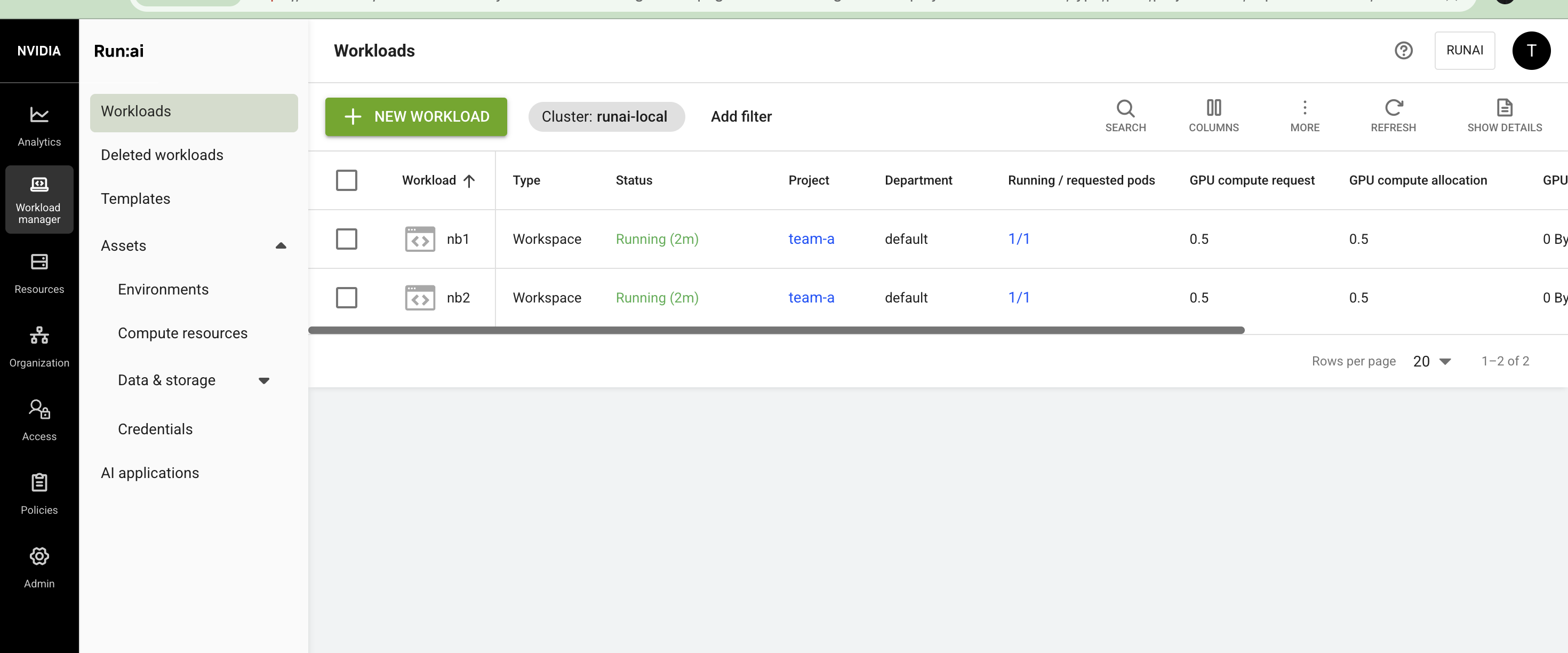
In the UI, both workspaces should appear on the Workloads page with 0.5 GPU each:
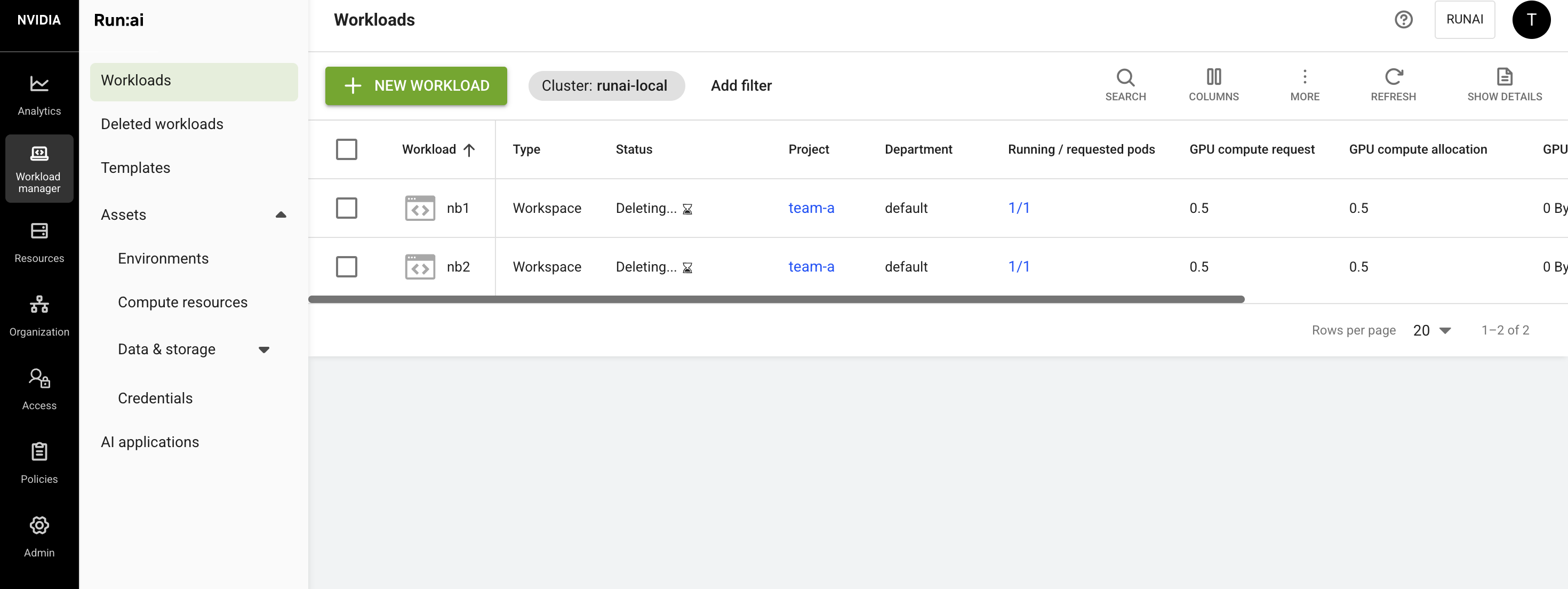
Delete them before the next demo:
runai workspace delete nb1 -p team-a
runai workspace delete nb2 -p team-a
Demo 3: Borrow idle GPUs, give them back#
This follows Run:ai’s own over-quota quick start, scaled to 32 GPUs.
In Run:ai: team-a’s quota is 16 GPUs, but team-b is idle. team-a submits four 8-GPU trainings (32 GPUs):
for i in 1 2 3 4; do
  runai training submit a$i -p team-a -i ubuntu -g 8 --command -- sleep infinity
done
runai training list -p team-a
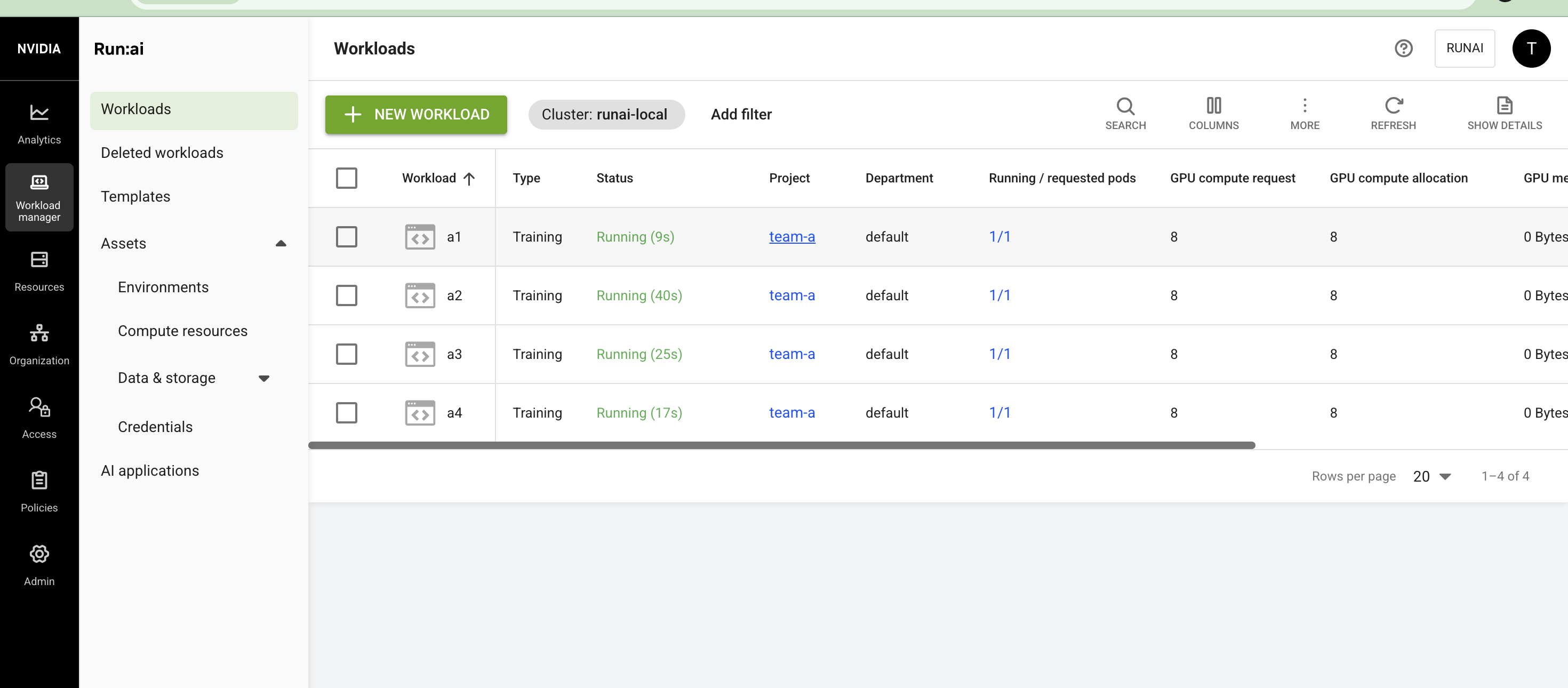
All four run. team-a is 16 GPUs over quota, which Run:ai allows because nobody else needs them. The Workloads page shows all four trainings running with 8 GPUs each, 32 in total against a quota of 16:
Now team-b, still under its quota, wants 8 GPUs:
runai training submit b1 -p team-b -i ubuntu -g 8 --command -- sleep infinity
runai training list -p team-b
runai training list -p team-a
Expected: the cluster is full, so KAI preempts one of team-a’s trainings to free 8 GPUs, and b1 starts. In my run, KAI picked a4. It went back to Pending with 0/1 pods, and b1 started running:
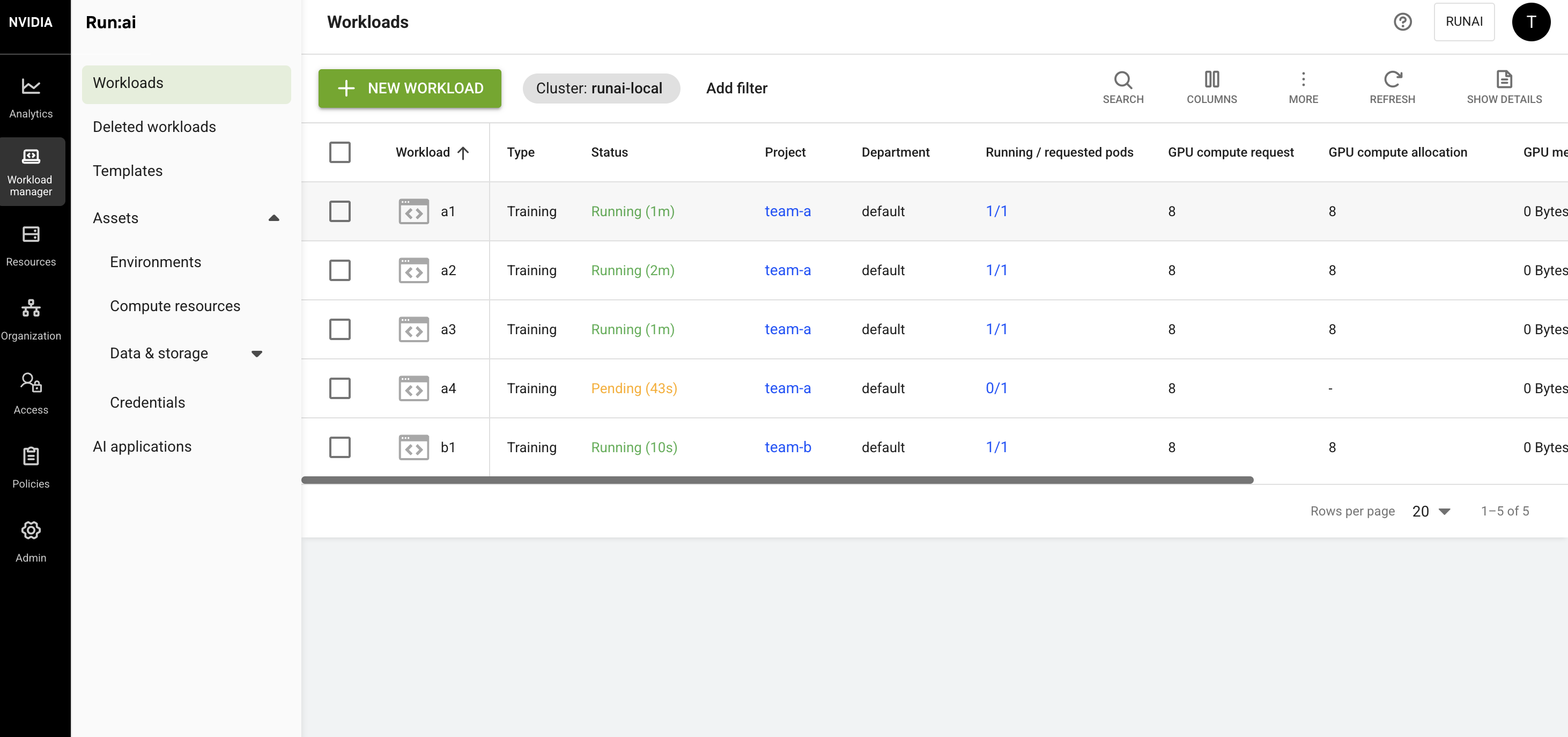
The preempted training stays pending until GPUs are free again. Trainings are preemptible by default in Run:ai. Workspaces and inference aren’t, so they only ever use in-quota GPUs.
Underneath:
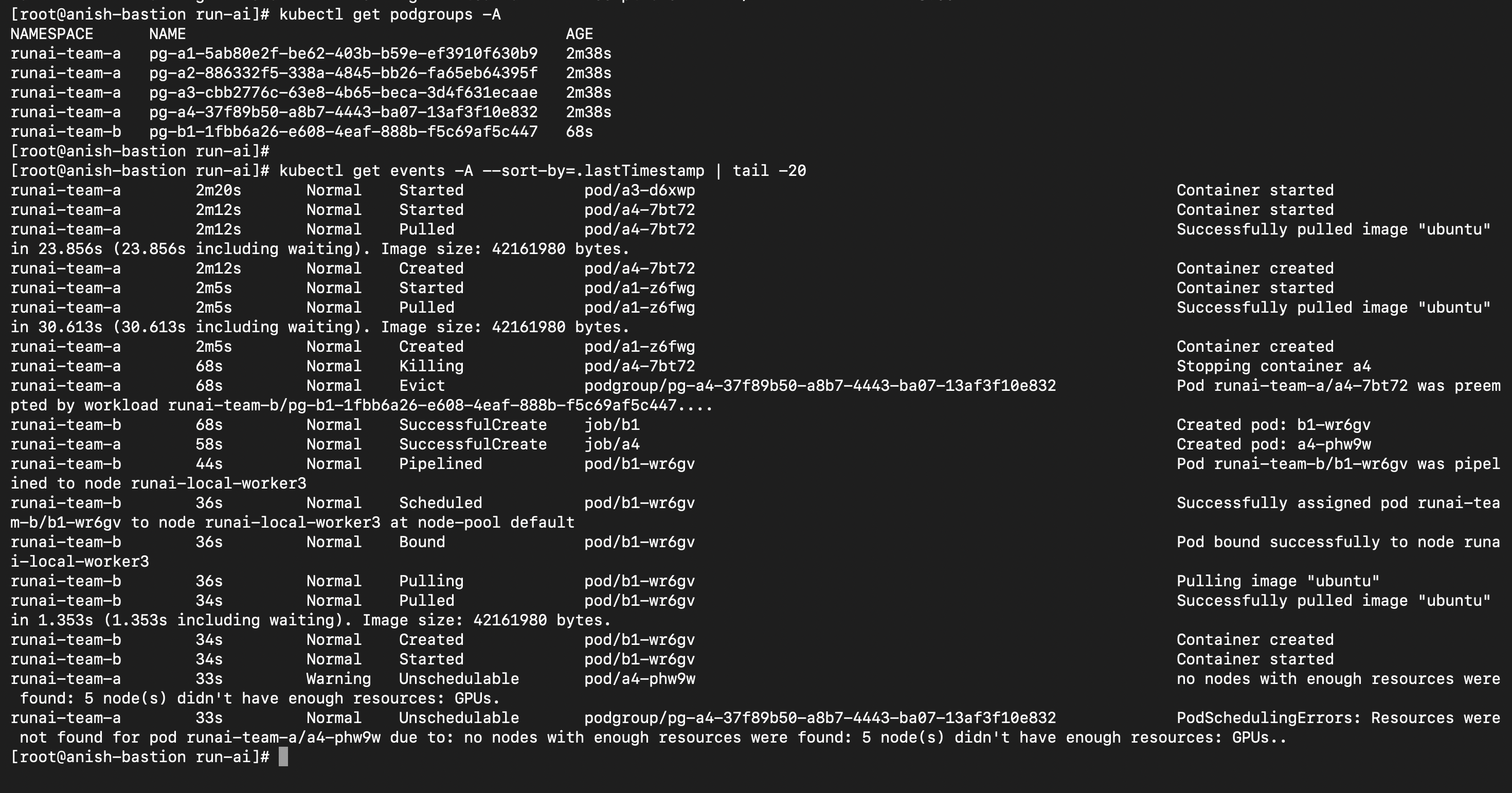
kubectl get podgroups -A
kubectl get events -A --sort-by=.lastTimestamp | tail -20
Each training is a PodGroup in KAI. The events show the whole story: a4’s PodGroup gets an Evict event saying it “was preempted by workload runai-team-b/pg-b1-…”, b1 is scheduled to runai-local-worker3, and the new a4 pod is Unschedulable because no node has 8 free GPUs:
Now give the GPUs back by deleting team-b’s training:
runai training delete b1 -p team-b
A few seconds later, a4 is scheduled again and all four team-a trainings are running:
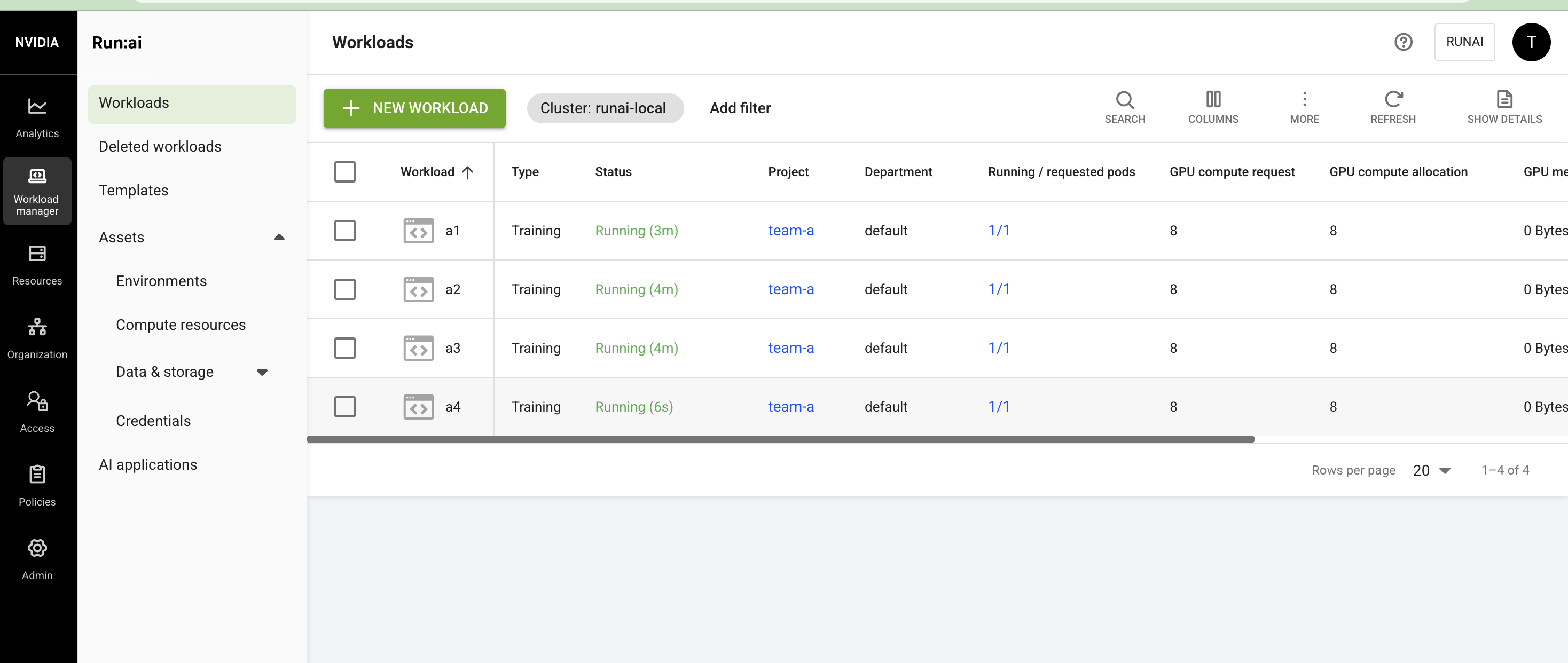
This is the core idea of Run:ai: GPUs never sit idle because of quota, and quota is still guaranteed when its owner comes back.
What about gang scheduling?#
Distributed trainings (runai training pytorch submit, MPI and similar) become one PodGroup that starts all workers at once or none. I skipped it here because those workloads need their framework operator (such as Kubeflow’s training operator) installed.
Clean up#
On the VM:
./local-dev.sh --teardown
This removes the kind cluster, the local registry, the built images and the /etc/hosts entry. A full build also leaves about 44 GB of build caches behind. Add --purge to delete those too, but the next run will then build from scratch. Remove the runai.local line from your laptop’s /etc/hosts as well.
KAI vs HAMi: are they competitors?#
Both let pods share a GPU, which I also covered with HAMi in an earlier post. But they solve different problems:
| HAMi | KAI Scheduler | |
|---|---|---|
| Main job | Split and isolate GPUs | Decide which team gets GPUs, when and where |
| GPU memory isolation | Yes (HAMi-core) | Not by default. Yes with HamiCore or NvFractions mode |
| Team quotas, reclaim, gang scheduling | No | Yes |
| GPU vendors | NVIDIA and others | NVIDIA |
They’re partners, not competitors. KAI decides which team gets GPUs and where pods run. HAMi-core enforces GPU memory limits at runtime, and KAI can use it through kai-resource-isolator. Use HAMi alone to split GPUs, and use Run:ai or KAI when teams compete for them.
Wrapping up#
Run:ai is two layers: a control plane where admins set team quotas and users submit work, and the KAI Scheduler in each cluster that enforces those quotas. The demo showed both at work. Projects became KAI queues, two notebooks shared one GPU, and one team borrowed idle GPUs and gave them back when another team needed them.
Until now, all of that was behind a commercial license. With the full platform open source, any team running GPUs on Kubernetes gets the same quota, sharing and preemption model that Run:ai customers have been paying for.